
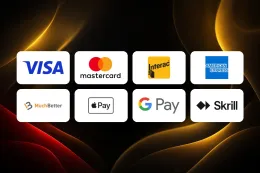

To make a deposit at Captain Cooks Casino, log in, open the cashier, choose a payment method, enter an amount of at least C$5 and confirm. The steps above show the order, and the table lists which methods work for deposits.
Before you start, have your login details to hand and choose a payment method that is registered in your own name. If you have not created an account yet, the sign-up guide comes first, and the login guide helps if you cannot get in.
This page covers what sits behind those steps, what to do when a payment fails and how to keep control of your account.
What stands behind a deposit

Checks you can expect
Online casinos in Ontario are for adults only. You must be 19 or over and in Ontario, and you must pass age and identity checks. Captain Cooks Casino requires identity verification. The documents it accepts are Passport, Driver's licence and Provincial ID. Have one ready before you deposit so a request for it does not interrupt you midway. The verification guide explains how the process works.
Choosing a payment method
The payment methods at Captain Cooks Casino are Visa / Mastercard, Interac e-Transfer, Interac Online, eCheck, American Express, MuchBetter, Apple Pay, Google Pay, Skrill, InstaDebit, iDebit and Bank transfer. They are not all the same. The table above marks each method for deposits and for withdrawals, and for some the withdrawal column shows that nothing is stated. Look at that column before you pick a method, because the way you put money in may not be the way you take it out. The withdrawals guide covers the other direction.
A few points apply to any method:
- Use an account, card or wallet that belongs to you. Paying from someone else's account is a common reason for payment problems.
- Check any fees with your own bank or wallet provider. Your provider sets those, and you should look at them before you confirm.
- Keep your wallet or banking app signed in and working. Several of these methods hand you over to your bank or wallet to approve the payment.
Minimum amount and timing
The minimum deposit is C$5. That is the lowest amount you can enter in the cashier, not a suggested amount. Decide the sum you are comfortable spending on entertainment before you open the cashier, and enter that.
Time is the part that varies by method. Some methods are approved through your bank or wallet before the payment is completed, so allow for that step. Never assume a deposit has arrived until you can see it in your balance.
Playing on a phone
If you deposit from an iPhone, the iPhone app is available. The mobile version page covers playing in a phone browser. Wherever you play, you need to be logged in to your own account to reach the cashier.
19+ · T&Cs apply
When a deposit does not go through

Most failed deposits come down to a few causes. Work through them in this order.
The amount is too low. Check that you entered at least C$5. An amount below the minimum will not be accepted.
The payment details are wrong. A mistyped card number, an expired card or a wrong wallet login stops a payment. Re-enter the details slowly and try again with the same method.
Your bank or wallet declined it. Banks sometimes block gambling payments, and some set their own limits. If that happens, your bank or wallet provider is the one that can say why. Try another method from the table above if you have one that is registered in your name.
The money left your account but the balance has not changed. Wait a little and check your balance again, then check your bank or wallet statement. A pending payment can look like a completed one at first. Do not repeat the payment while the first one may still be pending, because you could pay twice.
You cannot log in. Without access to your account you cannot reach the cashier. Use the password reset on the login page, or see the login guide.
When to contact support
If none of the above explains the problem, contact support. Captain Cooks Casino offers live chat and email, and there is no phone line. Support is available as follows: Live chat 24/7. When you write, include the payment method, the amount, the date and time, and any error message you saw. A screenshot of the message helps. The contact page lists how to reach the team.
If support asks for a document, send one of the types in the list above. Send only what is requested, and only through the casino's own channels.
Keeping your account and spending under control

- Enter your password only on Captain Cooks Casino's own website or app. This site has no login or payment form. If a message or page asks for your password or card details and you reached it through a link you did not expect, leave it and go to the casino yourself with visit Captain Cooks Casino.
- Set a deposit limit before you deposit. Deposit limits, breaks and self-exclusion are available, and BetGuard lets you opt out of all regulated online gambling sites in Ontario at once. The safer gambling page explains the options. If gambling stops feeling like entertainment, ConnexOntario offers free support.
- Keep your documents ready. A clear, current copy of one accepted document saves time if verification is requested.
- Check your statements. Compare your bank or wallet history with your cashier history now and then, so any mismatch shows up early.
- Use payment methods in your own name. It keeps your records simple and avoids payment problems.
- Read the terms before you deposit for an offer. If you are depositing for a bonus, check its conditions first. T&Cs apply to every offer, and the bonuses page lists what is available.